Introducing Tensor
November 2026
Today we're launching Tensor, an agentic development environment. You describe the work, an AI agent carries it out, and you review what it did. The agent reads the codebase, makes a plan, edits files, runs commands and keeps going until the task is done.
Tensor is available to everyone from today on Mac, Windows and the web. You can start on a free trial, and plans start at $2 (₦2,000) a month.
How Tensor works
An AI code editor suggests the next line and waits for you after every change. Tensor hands the agent a whole task.
You start by describing what you want: a feature, a fix, a question about the codebase, or a new project from nothing. The agent reads the code it needs, plans the work, writes the changes and runs them. When something breaks, it fixes it and runs again. Every task runs until it's done, and then the agent reports back with what it changed.
You stay in charge of the work. You direct the agent, approve what needs approving and review the result. The code is yours to read and change at any point. What changes is the unit of work: a task, not a keystroke.
Tensor is one place to manage your agents, whether they run on your machine or in the cloud. The desktop app works in the projects on your computer. Tensor on the web needs nothing installed, so you can start a project from a browser.
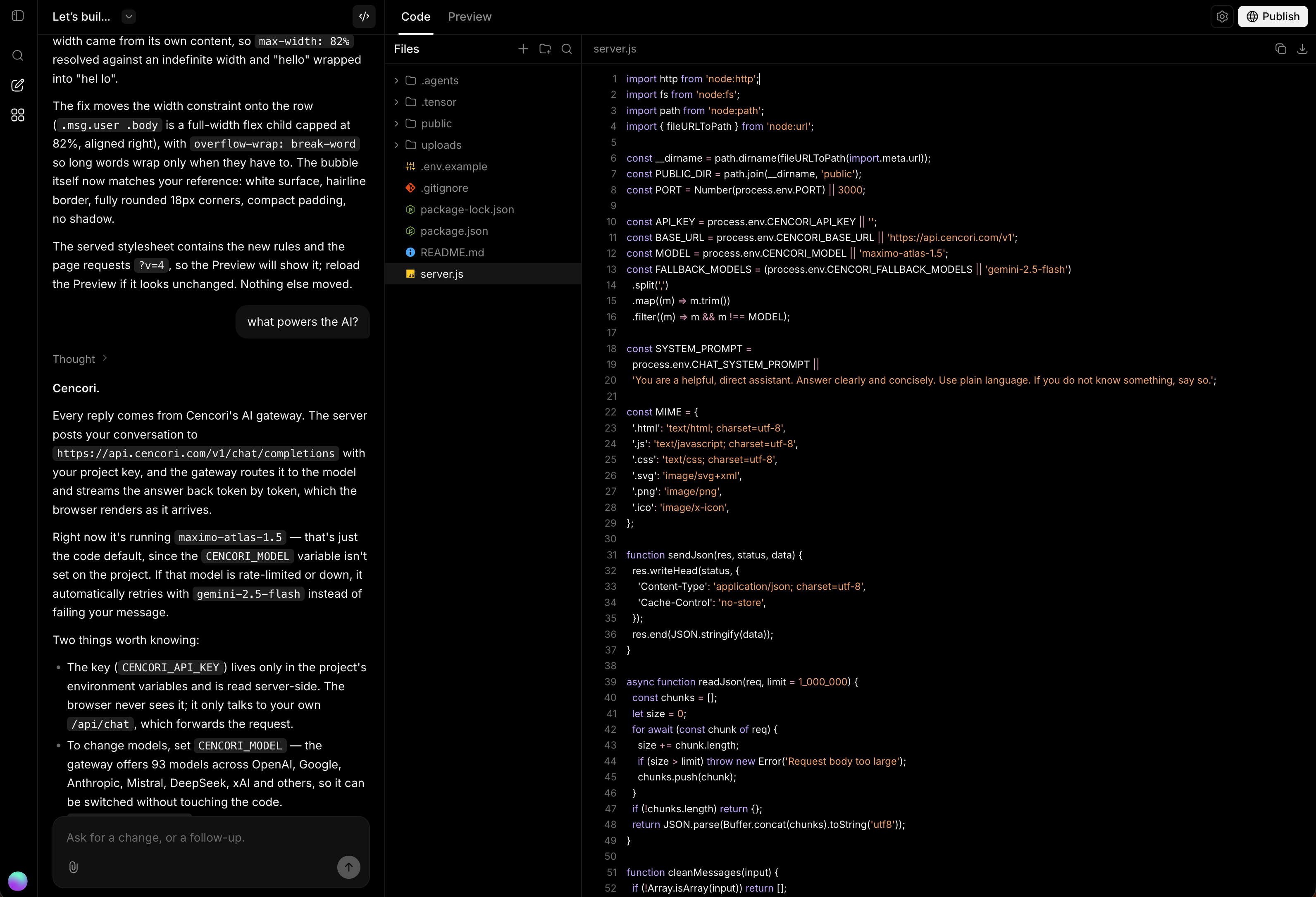
It is built for anyone making software. Engineers can hand off whole tasks and review what comes back. People with an idea and no codebase can have an agent build it with them.
Your models, your choice
Tensor works with models from OpenAI, Anthropic, Google, DeepSeek, xAI, Meta, Mistral, Qwen, Kimi and Zhipu.
There are three ways to choose what runs a task:
- Let Tensor choose. Tensor picks a model for each task. This is how the smaller plans work, and it is what keeps them affordable.
- Pick one yourself. On Max and Ultra you can choose any model, frontier models included.
- Bring your own key. Connect your preferred provider with your own API key.
The same work on fewer tokens
Before launch we ran Tensor against Claude Code, Codex and OpenCode on the same 28 coding tasks: bug fixes, changes across several files, new features, refactors and configuration work. Each agent started every task from a fresh copy of the same repository with the same prompt, and its work was scored by checks it never saw.
All four agents solved all 28 tasks and passed all 73 checks. Where they differed was in how much model usage it took to get there.
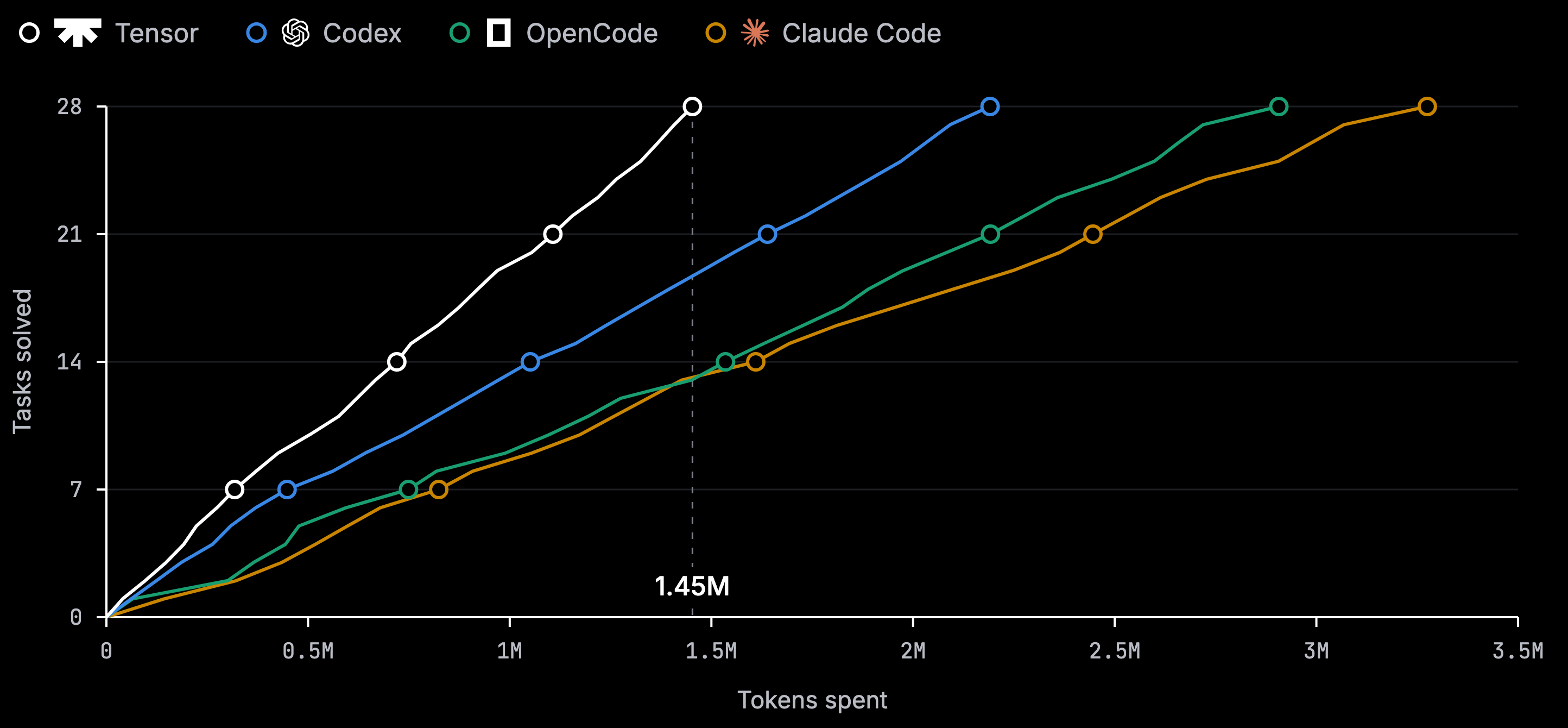
Further left is better: the same work for less usage. Tensor finished the suite on 1.45 million tokens. Codex used 1.5 times as many, OpenCode 2 times and Claude Code 2.3 times. Because Tensor usage is measured by what the models cost to run, an agent that spends fewer tokens on a task leaves more of your plan for the next one.
A few things to know when reading these numbers. Each agent ran as installed, so the models differ and this compares products, not models: Tensor ran GPT-6 Astra, Claude Code ran Claude Opus 5.5, Codex ran its default model at medium effort, and OpenCode ran Big Pickle. Tokens are input plus output, cached input included, as each agent reports them. Every task was run once, on 18 November 2026. The tasks are small Node.js projects, which is why every agent solved all of them. They measure how efficiently an agent works, not the limit of what it can do.
Bring your setup with you
If you already work with an agent, you don't start over. Tensor imports an existing Claude Code or Codex setup and can keep the imported configuration in sync.
You can also extend your agent with plugins, skills, servers and hooks, so it can reach the tools and services your work depends on.
From task to live site
Tensor publishes what you build. Every paid plan puts sites on the web at an address of their own, as many as you like.
An app with a backend runs on a machine of its own and keeps its data. It sleeps a few minutes after the last visitor leaves and wakes for the next one, so running time counts only while someone is using it. How many apps you can run, and how much storage and data they get, depends on your plan.
Pricing and availability
Tensor is available today:
- Download Tensor for Mac (Apple silicon and Intel) or Windows 10 and later
- Build on the web without installing anything
Every plan includes usage that refills each week. Usage is measured by what the models cost to run, so smaller models stretch it further.
| Plan | Per month | Model | Usage |
|---|---|---|---|
| Starter | $2 (₦2,000) | Tensor picks | Refills every week |
| Builder | $5 (₦5,000) | Tensor picks | 2.5x Starter |
| Pro | $15 (₦15,000) | Tensor picks | 7.5x Starter |
| Max | $20 (₦30,000) | You pick, frontier models included | Refills every week |
| Ultra | $100 (₦150,000) | You pick, frontier models included | 5x Max, two tasks at once |
You can pay in naira or in dollars. The pricing page has the full details, including what each plan allows for published sites and apps.
Why we built it
Cencori's mission is to build and run AI infrastructure that is accessible to everyone, everywhere. Tensor runs on that infrastructure, and it brings the same mission to the people who build software.
Most agentic coding tools are priced for engineers at well-funded companies. A plan that starts at $2 and can be paid for in naira means a student in Lagos, a freelancer in Nairobi and an engineer in San Francisco can all work with an agent on the same terms.
Get Tensor and follow @tensorade for updates.
Build different.